Bank setup
Add bank once
Add your name and paste your bank from RuneLite. The answer opens on that player page.
Banker
Show me what you are carrying and I will tell you what it finishes.
Paste bank
Paste your RuneLite bank.
How to copy your bank
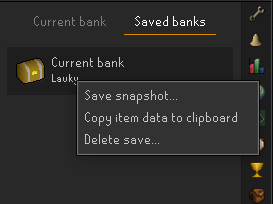
Your bank in RuneLite
Copy the saved bank from Bank Memory, then paste it into Scapestack.

1. Install Bank Memory
RuneLite Plugin Hub -> Bank Memory.
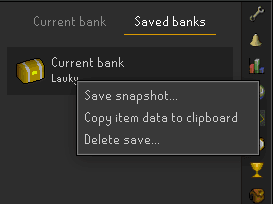
2. Copy item data
Right-click your saved bank and copy item data.
Saved on this device only. Bank Memory is best for supplies and GP.
Nothing in the bank yet.
Paste your bank first.
Saved on this device only. For automatic bank updates, use the RuneLite sync from your player page.